
BEHAVORIAL ECONOMICS IN DESIGN
Some designs feel effortless, intentional, and may draw users to feel like they ‘belong’ but why?
Behavioral economics explains why. When paired with sensory storytelling, design principles, and perception theories, the design can become a powerful tool that shapes the decision-making process. Designers use behavioral economics to build interfaces, products, and experiences that guide people, not by force, but through psychology, sensation, and structure.
Act I: The Setup
Behavioral economics studies how people make real decisions; messy, emotional, biased, and instinctive. Unlike classical economics, it recognizes that humans rarely think through choices rationally. We rely on:
heuristics (mental shortcuts)
defaults
social cues
visual perception patterns
sensory feedback
Designers rely on these tendencies in order to create a design that caters to the mind -in a way, studying user habits and predicting new ones.
Gestalt theory (Thoughtbot) shows that humans automatically perceive patterns and structure. We group similar elements, follow lines, fill in gaps, and prioritize contrast. Perception theory (SimplyPsychology) explains this even further: we interpret the world using both bottom-up processing (what we see) and top-down processing (our expectations).
Behavioral economics draws on these two theories and fills in the pieces on how those perceptions actually affect the choices we make.
Act II: The Confrontation
Choice architecture, a core idea in behavioral economics, is the intentional structuring of options to guide users toward a desired action.
Example: Apple iCloud Setup
“Enable iCloud Backup” = big blue button
“Not Now” = small gray link
In this screenshot, Apple highlights the action button in blue while giving the option to exit out in usual grays or whites to show the opposite effect.
This uses:
Default effect: People choose the highlighted or easier option.
Gestalt figure–ground: The button is the “figure” pulling attention forward.
Affordances: The button looks more clickable (Interaction Design Foundation).
Multi-Sensory Design
In Act 3: Sensation, Ellen Lupton says design communicates emotionally through color, texture, scale, rhythm, and motion. This expands into multi-sensory design, where multiple elements like visual, auditory, tactile cues shape behavior and habits.
Behavioral link:
Sensory cues lower cognitive load and build trust, making users more likely to complete actions.
Users feel grounded → they commit → they continue.
Perception Shortcuts: Using Gestalt
Gestalt principles directly support behavioral economics by helping users interpret information in predictable ways.
Proximity suggests items belong together → boosts clarity.
Similarity creates categories → aids fast decision-making.
Continuity creates movement → influences navigation choices.
Common region groups important content → increases conversion.
Example: motelrocks
On motelrocks, each product card is designed to act as a behavioral nudge:
Each product is enclosed in a clean, bordered card (common region), which increases clarity and raises click-through rates by reducing visual noise.
The sale badge or “New In” tag sits closely above the product photo (proximity), so users instantly associate the label with that specific item.
Each product card uses uniform image sizing and typography (similarity), making the browsing experience fast and fluid.
The scroll layout naturally moves the eye downward from the model → price → quick-add icons (continuity), nudging users toward the next action.
These design choices make certain items stand out without explicitly telling the user what to choose. Behavioral economics calls this a visual nudge; shaping decisions through structure, not force. Users feel they’re browsing freely, but the layout is strategically crafted to draw their attention to featured pieces, new arrivals, and sale items.
Affordances: Showing What Actions Are Possible
Affordances (Interaction Design Foundation) explain how design signals to users what they can do. Behavioral economics says people choose the option that appears easiest. Take a look at your social media platforms; for example, apps like Twitter (X), Instagram, and TikTok are designed specifically for ‘easy access.’
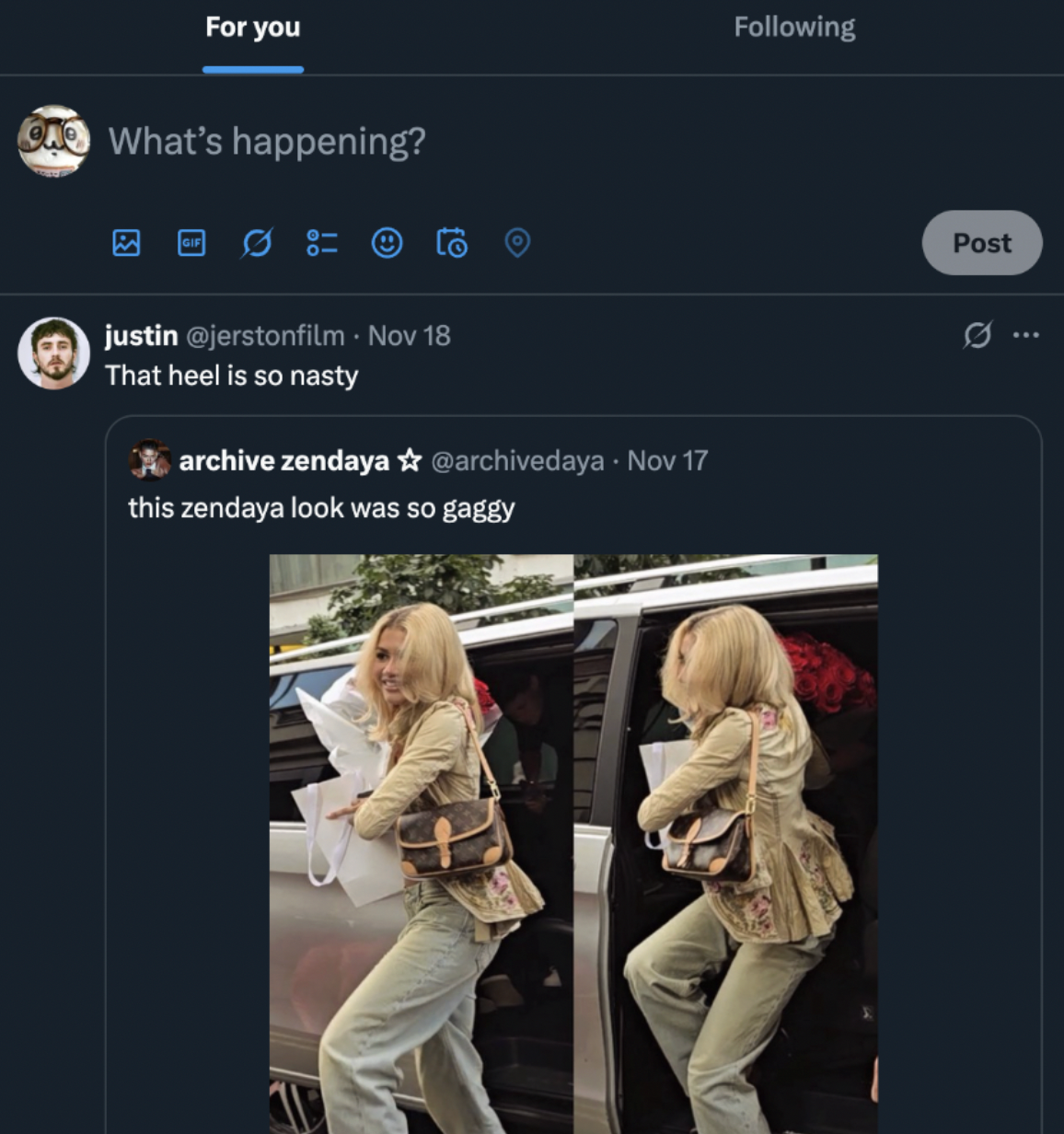
By placing the text box at the top of the feed, Twitter subtly pushes users toward creating content before scrolling passively. This is behavioral economics in action: the user is more likely to post because the interface makes posting the easiest visible action.
Instagram’s bottom navigation bar uses a persistent camera icon that taps into perceptual habits:
Shape and iconography = “tap me to create”
Centralized placement for years signaled that creation is core to the experience
The camera icon acted as an affordance for immediacy and spontaneity
Even after redesigns, Instagram continues placing creation tools where users’ thumbs naturally rest, another behavioral nudge based on motor memory and ease.
TikTok: The Center “+” Button
TikTok takes affordances even further.
Its large, floating center “+” button creates:
perceptual salience (gestalt: figure-ground)
a clear affordance — “tap to create”
a frictionless path — one tap → camera opens
behavioral nudging — creation appears easier than consumption
This aligns with behavioral economics’ concept of effort minimization: people will choose the path that looks simpler and requires fewer steps. Since the “+” button is the most visually dominant element in the navigation bar, it subconsciously prompts users to generate content rather than just scroll.
Why do these matter?
Across Twitter, Instagram, and TikTok, affordances function as behavioral cues:
They reduce cognitive load
They encourage specific actions through visual hierarchy
They align with the brain’s preference for familiar patterns and easy choices
They shape user behavior without explicit instructions
When a user posts, shares, likes, or records a video, it often feels spontaneous, but the interface has already paved the path.
Act III: The Resolution
Behavioral design isn’t about manipulation. The goal is to create experiences that align with human perception, cognition, and emotion. As a user, you’ll encounter these design practices while shopping online, scrolling through your social media feed, or navigating a site for a service. They're important for psychological behavior, online habits, and the future of design.
Good behavioral design guides people the same way a good story does: through emotional clarity, sensory richness, and thoughtful structure.
Behavioral economics gives designers a deeper understanding of why people behave the way they do. When integrated with visual perception theories, sensory design, and affordance-driven interfaces, it creates products that don’t just look good aesthetically but to guide, support, and empower the user.
Design isn’t just a visual practice but also a behavioral one.
Sources
Lupton, E. (2017). Design is storytelling. Apple Books.
Márquez, A. (2017, July 23). What is multi-sensory design? Akna Márquez.
https://www.aknamarquez.com/blog/2017/7/23/what-is-multi-sensory-design
Simply Psychology. (n.d.). Perception: Theories and explanations. SimplyPsychology.
https://www.simplypsychology.org/perception-theories.html
Interaction Design Foundation. (n.d.). Affordances. Interaction Design Foundation.
https://www.interaction-design.org/literature/topics/affordances
Thoughtbot. (2019, February 19). Gestalt principles in UI design. Thoughtbot.
https://thoughtbot.com/blog/gestalt-principles
